On-site delivery
Show day, run from the same record as the program.
A small Windows agent turns Speaker Ready, the reception desk and every room computer into one system your crew can see and steer, from the portal or a phone.
Mix and match for each event. Run the room computers on their own, add Speaker Ready, add the reception desk, or use all four. The event hub is an extra layer of protection, there if you want it.
Station by station
Use the stations your event needs
Review stations
Where speakers check their talk before it goes to the room.
- Speakers check in by name or with a personal code
- They open their talk, review it and fix it on the station
- Changes are saved back as a new version, with the history kept
- The approved talk is released to its room
Reception desk
The first stop for a speaker arriving at Speaker Ready.
- Looks a speaker up and checks them in
- Sees which review stations are free and sends the speaker to one
- Emails a speaker their agenda: their talks, times and rooms
Room computers
The podium machine: the session's talks on the operator display, the slides on the room screen.
- Files delivered ahead and kept on the machine; nothing is presented over a network share
- Launch a talk, or launch the next one, from files already on hand
- Show or hide the holding screen between talks
- Rehearsal mode, and stop presenting
- Every command works from the room, the portal or a tech's phone
Readiness checks
Every room computer checks itself and reports green, yellow or red, with what to fix.
- Displays, PowerPoint, audio and the holding screen
- Files on hand, disk space, and the connection to Rostrum and to the hub
- One board shows every room at a glance
Event hub
An extra layer of protection on the venue's own network, there if you want it.
- Every released file cached on the hub, so rooms pull locally first
- Each room still runs a full day without the network, with or without a hub
- The hub shows up for the crew beside every other computer
Crew coverage and Call tech
Techs are assigned to what they look after, and the right people hear when something needs them.
- Coverage by room, zone and Speaker Ready group; leads cover everything
- Call tech at any station texts the techs covering it
- A computer that goes offline alerts its techs by text, and every text is in the messages log
- Each tech has a phone page with their rooms live, and can send commands from it
See it in action
Show day for the tech crew
Read what the video shows
- On show day, every computer at the meeting reports in live: Speaker Ready, the reception desk and the rooms.
- Every room has a tech, organized by zone, with a lead over all of them.
- In Hall 1, a speaker has no sound. The computer in the room calls a tech with one button.
- The tech covering Hall 1 gets a text within seconds.
- It opens their page, with their rooms live.
- From the hallway, they can see the room’s computer and the controls for it. No laptop needed.
Read what the video shows
- This is the sign outside Hall 2C, showing the day’s sessions in that room.
- The organizer moves a session, Imaging I, from Hall 1 to Hall 2C, and confirms.
- Nobody touches the sign. On its next refresh, Imaging I is on it, with its talks and speakers.
Or step through it, screen by screen
Real screens from a demo event: coverage, readiness, one room's controls, a Call tech text and the tech's phone.
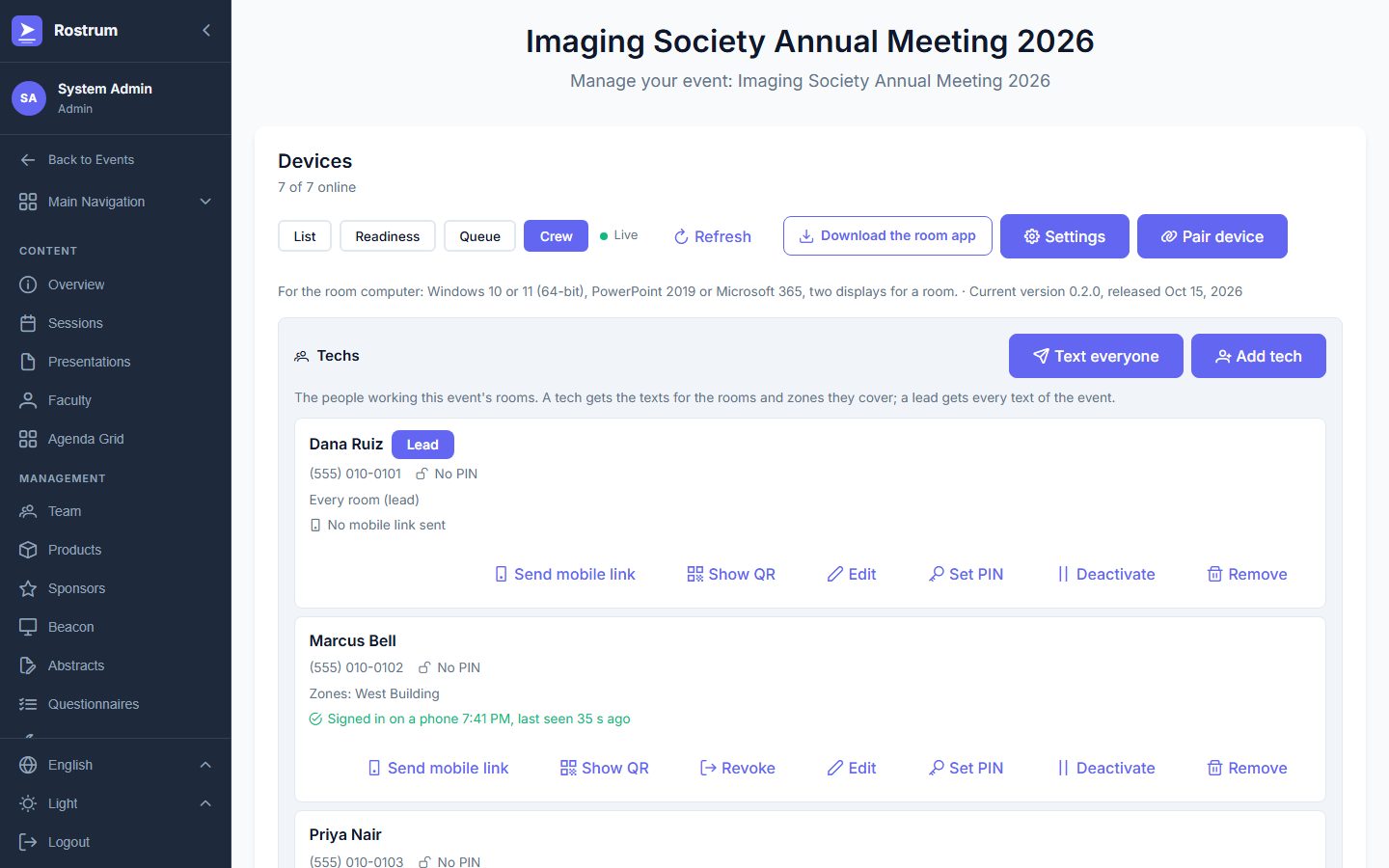
1. The crew, and who covers what
Techs and leads with the rooms, zones and Speaker Ready groups each one covers, and who is signed in on a phone.
What it needs
Ordinary Windows computers
Your next meeting
Plan show day with us.
Tell us about the rooms, the stations and the crew. We reply within one business day with how it would run.